Combining Colors and Patterns
Michael Friendly
2026-11-07
Source:vignettes/combining-colors-patterns.Rmd
combining-colors-patterns.RmdExperimental. scale_cheysson() is new
in ggCheysson 1.1.0, and was changed in 1.2.0 to a single scale using
the swatches described below; its interface may change again.
In 1.2.0, aes_cheysson() is deprecated: it is now the same
as aes(pattern = x).
Palettes that combine color and hatching
In the Albums de Statistique Graphique, a class on a map or a bar in a chart was rarely distinguished by color alone. Cheysson’s palettes combine colors with hatching: solid fills, stripes at different angles and spacings, and crosshatching, sometimes in two colors.
Each element of a palette in cheysson_patterns is
therefore a small bundle of properties. Here are the six elements of
palette 1886_28:
pats <- cheysson_pattern("1886_28")
data.frame(
  pattern       = cheysson_pattern_params(pats, "pattern_type"),
  fill          = cheysson_pattern_params(pats, "fill"),
  pattern_fill  = cheysson_pattern_params(pats, "pattern_fill"),
  pattern_fill2 = cheysson_pattern_params(pats, "pattern_fill2"),
  pattern_angle = cheysson_pattern_params(pats, "pattern_angle")
)
#>   pattern        fill pattern_fill pattern_fill2 pattern_angle
#> 1  stripe transparent      #d61d21       #d61d21            90
#> 2  stripe transparent      #53679b       #53679b             0
#> 3  stripe transparent      #060304       #060304             0
#> 4    none     #53679b      #53679b       #53679b            45
#> 5    none     #d61d21      #d61d21       #d61d21            45
#> 6 none #060304 #060304 #060304 45-
pattern: the hatch type,"none"for a solid fill -
fill: the paper or fill color behind the hatching ("transparent"for hatching on bare paper) -
pattern_fill: the color of the hatch lines -
pattern_fill2: the color of a crosshatch’s second set of lines (the same aspattern_fillexcept in two-color crosshatches) -
pattern_angle: the angle of the lines
The long way: one mapping and one scale per property
In ggplot2 with ggpattern, each of these
properties is a separate aesthetic. To apply a palette to a variable,
each aesthetic needs both a mapping in
aes() and a scale that supplies its
values:
trade <- data.frame(
  country = c("France", "England", "Germany", "Italy"),
  exports = c(2350, 3120, 2680, 1890)
)

ggplot(trade, aes(country, exports)) +
  geom_col_pattern(
    aes(fill = country, pattern = country, pattern_fill = country,
        pattern_fill2 = country, pattern_angle = country),
    pattern_colour = NA, pattern_density = 0.3, pattern_spacing = 0.025,
    colour = "black"
  ) +
  scale_fill_cheysson_pattern("1886_28") +
  scale_pattern_type_cheysson("1886_28") +
  scale_pattern_fill_cheysson("1886_28") +
  scale_pattern_fill2_cheysson("1886_28") +
  scale_pattern_angle_cheysson("1886_28") +
  labs(title = "Exports by Nation, 1885", x = NULL, y = "Thousands of francs") +
  theme_cheysson() +
  theme(legend.position = "none")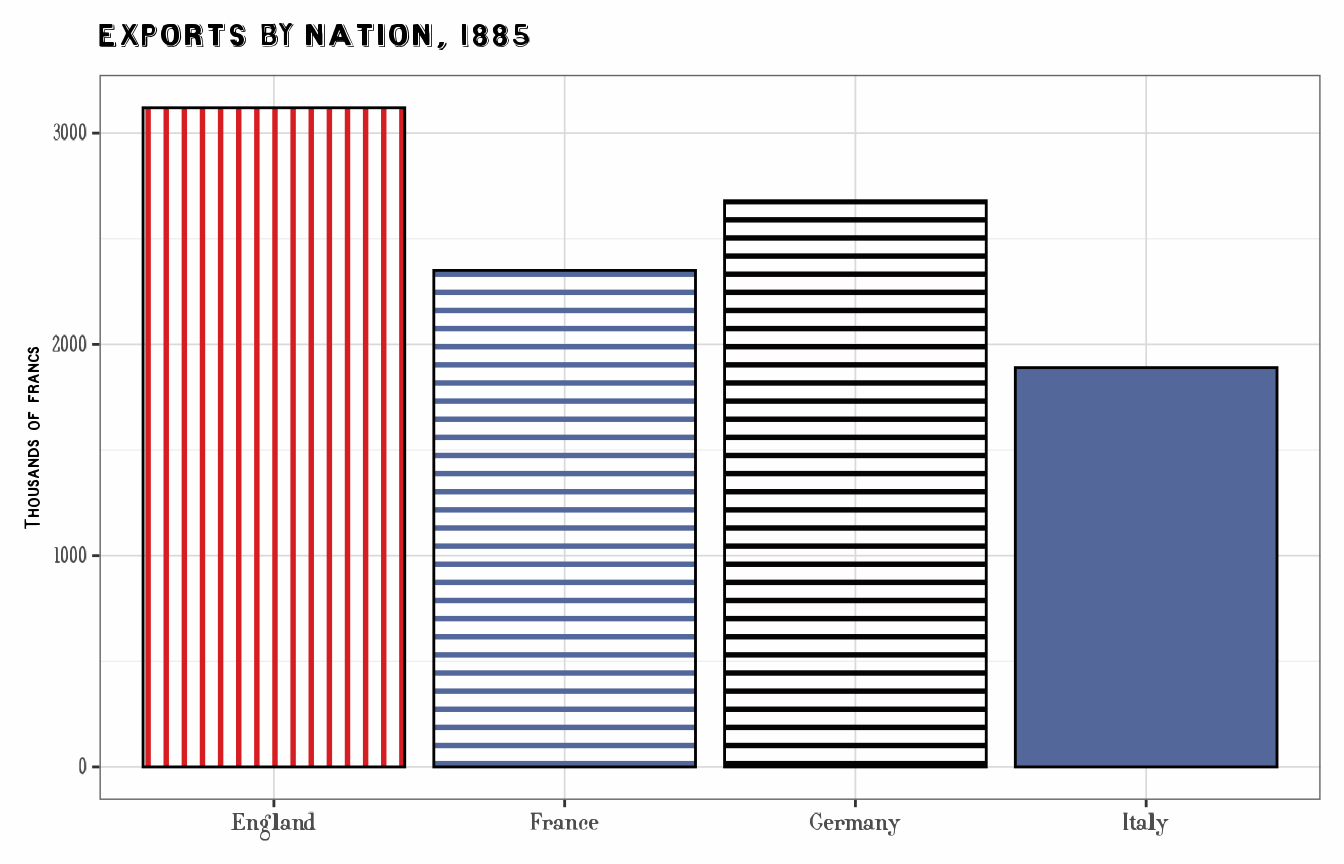
The short way: swatches and scale_cheysson()
ggCheysson registers each element of each palette as a
ggpattern pattern of its own, a swatch, named
"<palette>-<element>"
(e.g. "1886_28-1"). A swatch draws all of the element’s
properties together: its fill or paper color, hatch type, line colors
and angle, as well as its own line spacing and density. So only one
aesthetic needs to be mapped, pattern, and
scale_cheysson("1886_28") is a single scale that gives each
level of country one swatch. This draws essentially the
same plot as above (the swatches’ line spacings differ slightly,
following Cheysson’s; see Line
spacing and density):
ggplot(trade, aes(country, exports, pattern = country)) +
  geom_col_pattern(colour = "black") +
  scale_cheysson("1886_28") +
  labs(title = "Exports by Nation, 1885", x = NULL, y = "Thousands of francs") +
  theme_cheysson() +
  theme(legend.position = "none")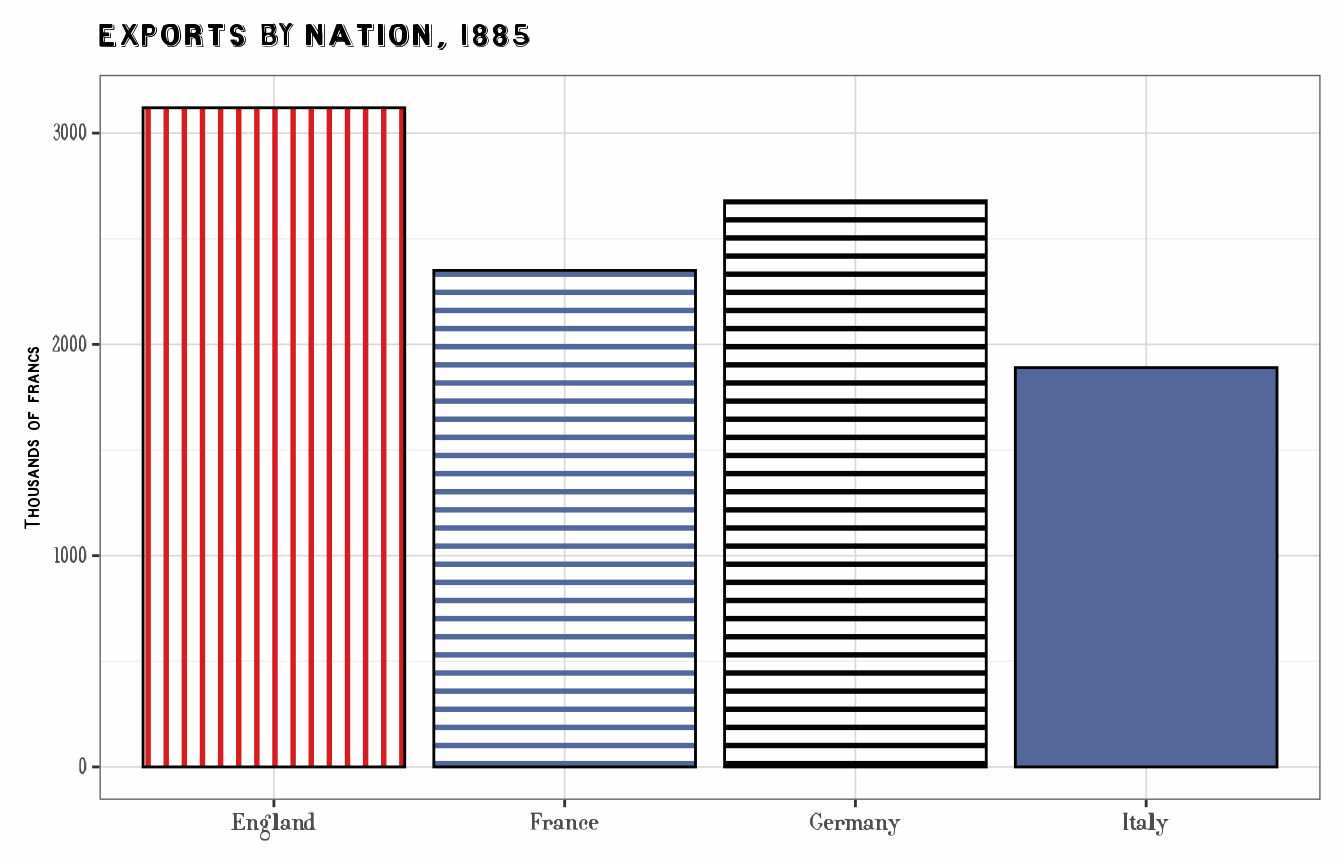
The other pattern aesthetics, such as pattern_fill or
pattern_angle, aren’t needed, and a swatch ignores them if
they are mapped or set. The exceptions are pattern_spacing
and pattern_density, which change how close and how thick
the lines are; see Line spacing and
density below.
Choosing a palette: the swatch atlas
show_swatches() draws every swatch, one row per palette
and one column per element, with the palettes grouped by type. A
swatch’s name is its row and column: row 1886_28, column 3
is "1886_28-3". scale_cheysson("1886_28") uses
that row from left to right, and when the data have fewer levels than
the palette has elements, it picks elements spread across the row (see
Ordered
data).
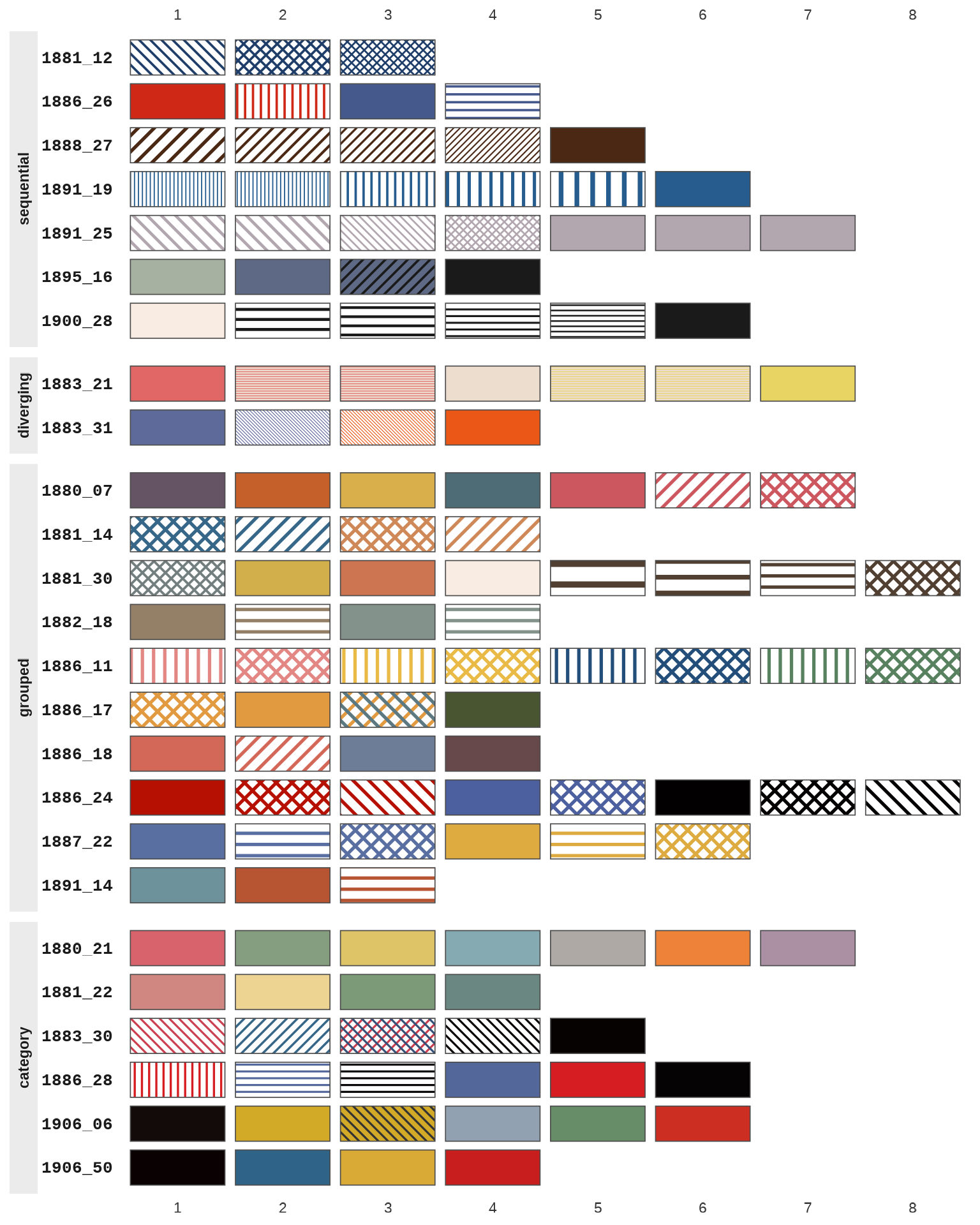
The atlas shows how Cheysson built each kind of palette. In
sequential palettes such as 1888_27 and
1900_28, the steps are hatchings of increasing density,
ending in a solid color. In grouped palettes such as
1886_11 and 1886_24, each color comes as
stripes and crosshatching, or solid and hatched. Category palettes are
mostly solid colors. To see only some palettes, give their names or a
type, e.g. show_swatches("diverging").
Legends
There is one scale, so there is one legend, and its keys show the
full swatches. Arguments to scale_cheysson() such as
name and labels go to that scale. Here a
sequential palette, 1881_12, whose three steps are
hatchings of increasing density in a single color, distinguishes three
kinds of transport:
infrastructure <- data.frame(
  region = rep(c("North", "South", "East", "West"), each = 3),
  type   = factor(rep(c("Road", "Canal", "Rail"), 4), levels = c("Road", "Canal", "Rail")),
  length = c(250, 300, 450,  250, 400, 350,  300, 200, 500,  250, 350, 400)
)

ggplot(infrastructure, aes(region, length, pattern = type)) +
  geom_col_pattern(position = "dodge", colour = "black") +
  scale_cheysson("1881_12", name = "Network") +
  labs(title = "Transportation Networks by Region", x = NULL, y = "Hundreds of km") +
  theme_cheysson()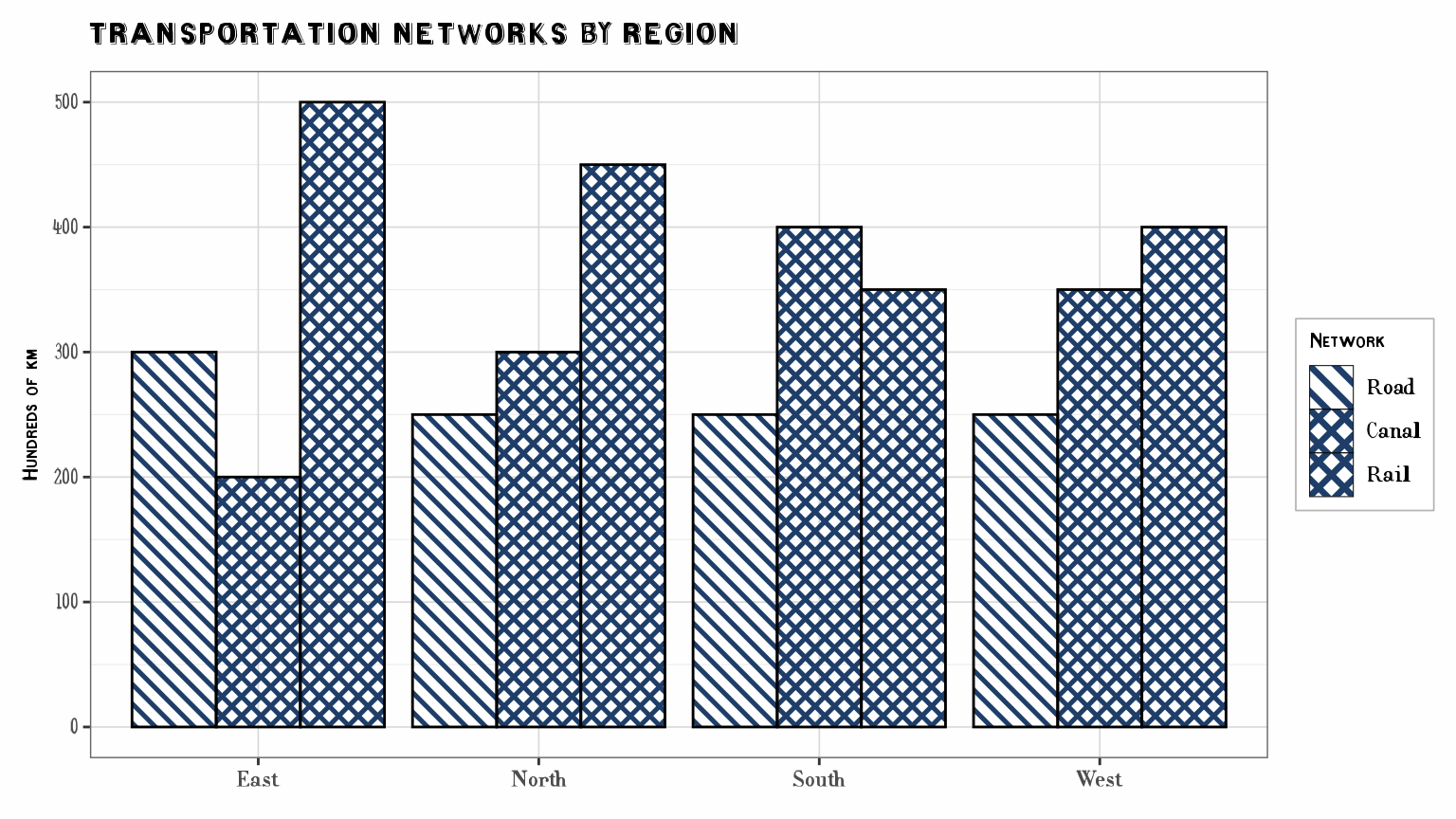
Ordered data: sequential and diverging palettes
Sequential palettes are stored from low to high (light to dark), and
diverging palettes from one extreme through the middle to the other, so
reverse = TRUE flips every palette the same way. When the
data have fewer levels than the palette has elements, the scales pick
elements spread over the whole palette, keeping both ends.
Palette 1883_31 is diverging: two hues, each used solid
and hatched. As in Cheysson’s maps, the solid fills mark the extremes
and the hatched versions the milder classes:
opinion <- data.frame(
  response = factor(c("Strongly against", "Against", "For", "Strongly for"),
                    levels = c("Strongly against", "Against", "For", "Strongly for")),
  percent = c(18, 27, 34, 21)
)

ggplot(opinion, aes(response, percent, pattern = response)) +
  geom_col_pattern(colour = "black") +
  scale_cheysson("1883_31") +
  labs(title = "A Diverging Palette", x = NULL, y = "Percent") +
  theme_cheysson() +
  theme(legend.position = "none")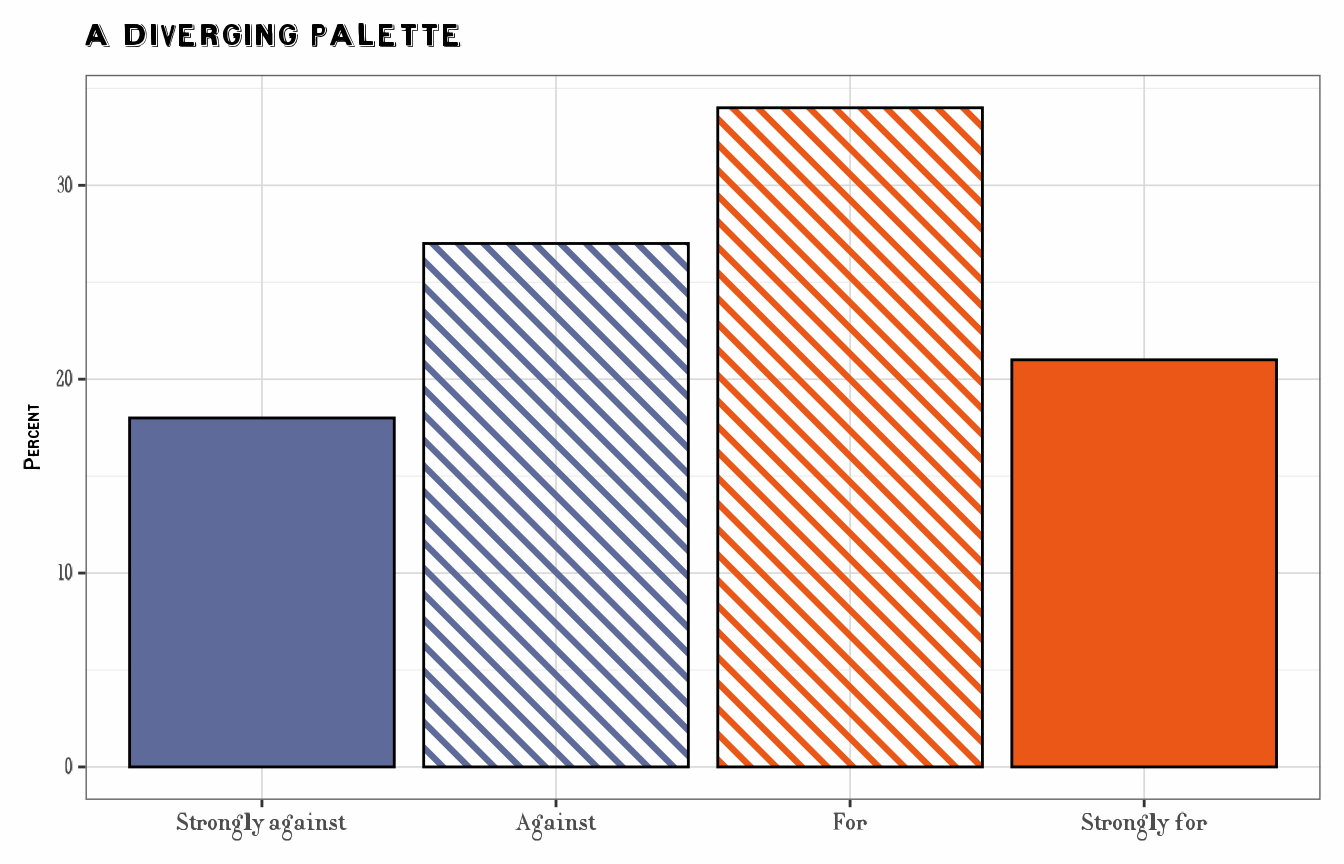
Missing values
Missing values get the pattern na.value, by default
"none": no swatch, so the bar shows the geom’s own
fill. Since every swatch covers the geom’s fill, setting
fill in the geom sets the color for missing values
only:
trade_na <- rbind(trade, data.frame(country = NA, exports = 1500))

ggplot(trade_na, aes(country, exports, pattern = country)) +
  geom_col_pattern(fill = "grey90", colour = "black") +
  scale_cheysson("1886_28") +
  labs(title = "Exports by Nation, 1885", x = NULL, y = "Thousands of francs") +
  theme_cheysson() +
  theme(legend.position = "none")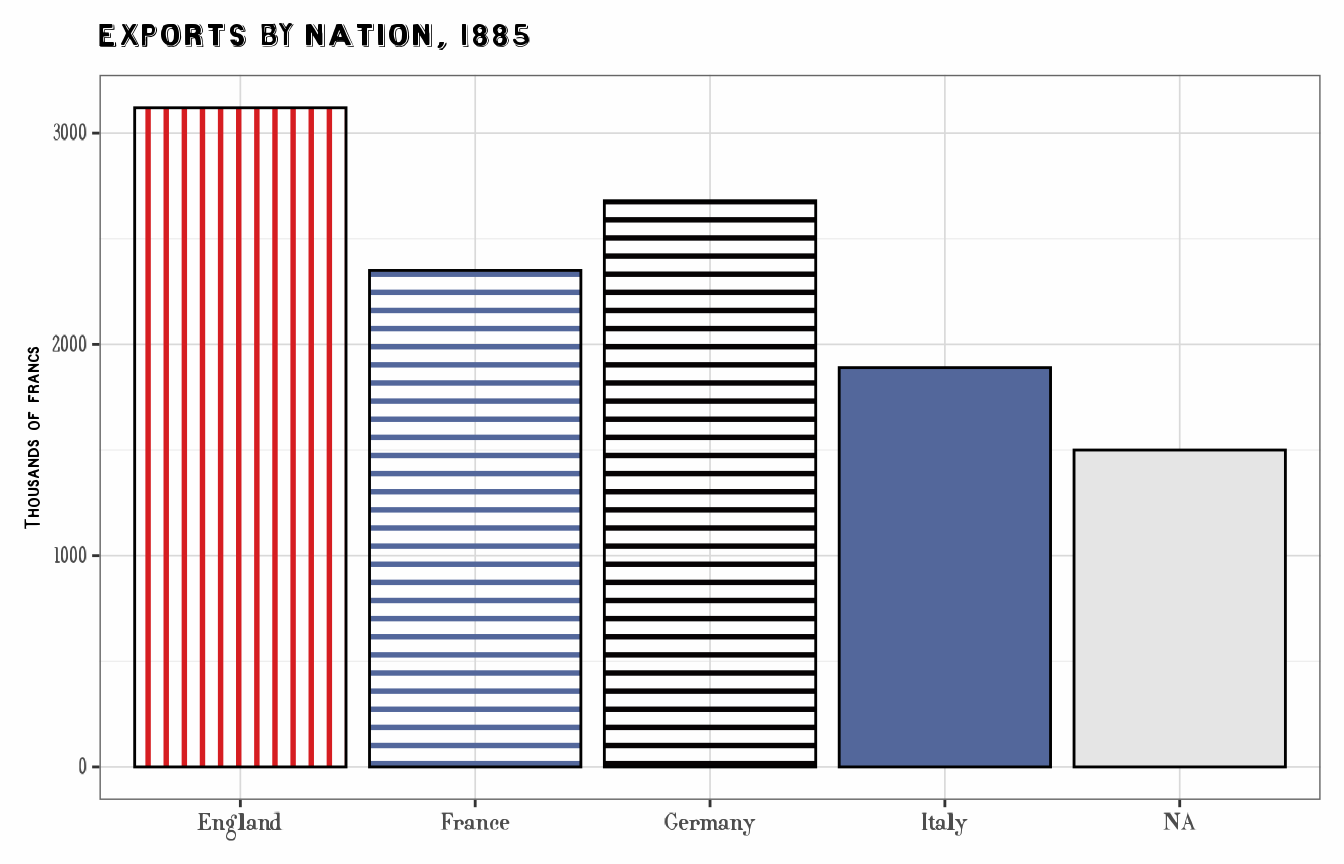
Line spacing and density
The swatches of a palette keep the relative line spacings Cheysson
used, measured on his plates: in a sequential palette such as
1888_27 the hatching gets denser at each step (see the
literacy map in
vignette("guerry-maps", package = "ggCheysson")). A
palette’s typical swatch has a spacing of 0.025, and all draw their
lines with a density of 0.3, which suit plots of about this size.
pattern_spacing in the geom sets that typical spacing,
and the other swatches keep their proportions to it;
pattern_density sets the density. What they mean depends on
the version of ggpattern:
-
ggpattern 1.4.0 or later: they replace the
defaults, so
pattern_spacing = 0.05gives lines twice as far apart. -
Earlier versions: these always supply their own
values (0.05 and 0.2), so the swatches treat a setting as relative to
those:
pattern_spacing = 0.1gives lines twice as far apart.
So code that sets them may draw differently when
ggpattern is updated; set them only when needed. See
?cheysson_swatches for details, including
pattern_units.
Using only some of a palette’s properties
A swatch always applies all of an element’s properties. To use only
some of them, use the individual scales,
scale_fill_cheysson_pattern() and the
scale_pattern_*_cheysson() family, as in the long
way above, and map only the aesthetics you want. Here the bars keep
the palette’s fills, hatch types and line colors, but not its
angles:
ggplot(trade, aes(country, exports, fill = country, pattern = country,
                  pattern_fill = country)) +
  geom_col_pattern(pattern_colour = NA, pattern_density = 0.3, pattern_spacing = 0.025,
                   colour = "black") +
  scale_fill_cheysson_pattern("1886_28") +
  scale_pattern_type_cheysson("1886_28") +
  scale_pattern_fill_cheysson("1886_28") +
  labs(title = "Without the palette's angles", x = NULL, y = "Thousands of francs") +
  theme_cheysson() +
  theme(legend.position = "none")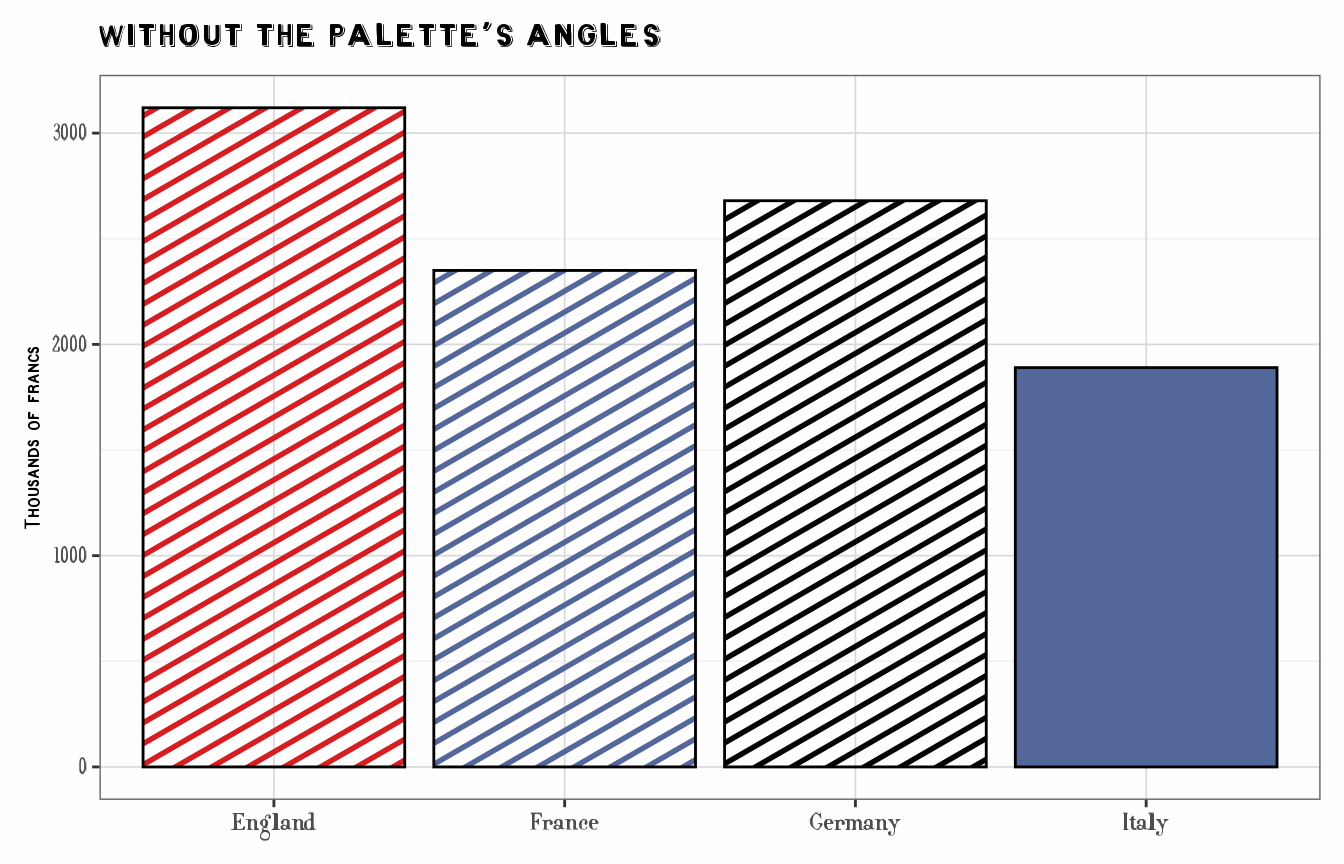
What is not included
- Line widths: all swatches use the same density, so a hatching’s
darkness comes from its spacing alone. A few palettes, such as
1891_19, trade spacing against line width, and draw less faithfully. - The scales are discrete. For continuous data, cut it into classes first, as Cheysson did.
- For plots without patterns (
geom_col(),geom_point(), …), usescale_fill_cheysson()andscale_color_cheysson(), which use the palettes’ colors only.